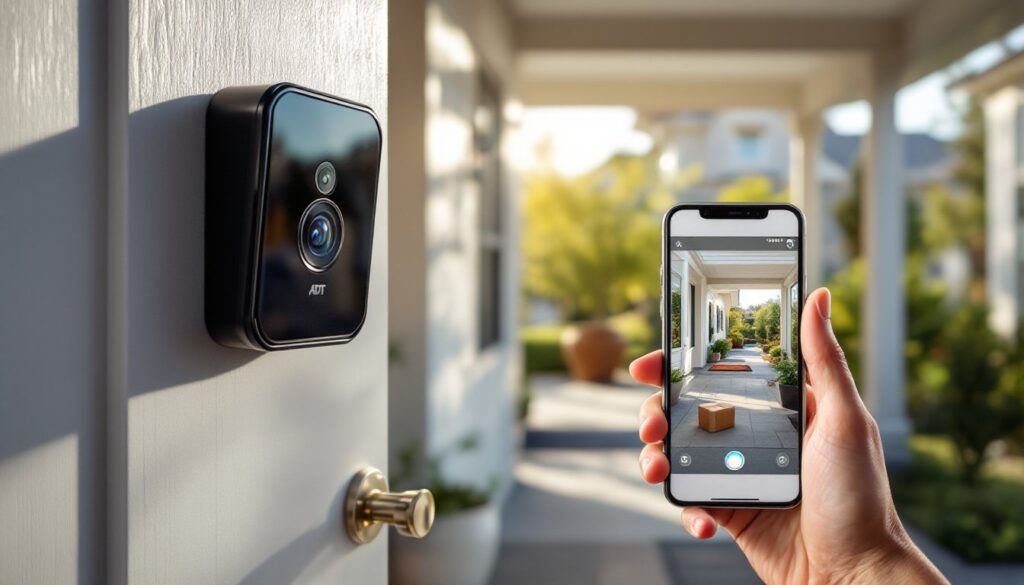
An ADT doorbell camera combines front-door surveillance with smart home convenience, giving homeowners real-time video feeds and two-way audio from their phones. Whether you’re monitoring packages, checking on visitors, or strengthening home security, an ADT doorbell camera has become standard equipment for modern homes. This guide walks through what these devices offer, how to install one, and what you’ll actually spend, no fluff, just practical information to help you decide if it’s the right choice for your home.
Table of Contents
ToggleKey Takeaways
- An ADT doorbell camera replaces your existing doorbell to deliver real-time video, two-way audio, and motion alerts directly to your smartphone for remote door monitoring.
- Installation varies from simple battery-powered setup (under 30 minutes, no wiring) to complex wired installations requiring permits and potentially a licensed electrician ($100–$800 total cost).
- ADT doorbell cameras range from $200–$500 upfront, but factor in monthly subscriptions ($5–$15) for cloud storage and monitoring, adding $60–$180 annually to your actual costs.
- Video quality matters: choose at least 1080p resolution with true infrared night vision and 160–180 degree field of view to capture recognizable faces and read package labels.
- Integration with Alexa, Google Home, or Apple HomeKit unlocks automation like automatic door locks and motion-triggered lighting, but requires compatible hardware and often comes with subscription fees.
- Compare ADT doorbell cameras against Ring, Wyze, and Google Nest before committing—unless you already subscribe to ADT monitoring, you may be paying for brand recognition rather than superior performance.
What Is an ADT Doorbell Camera?
An ADT doorbell camera is a video-equipped doorbell that replaces or works alongside your existing doorbell to record video footage and send alerts to your smartphone. Unlike a traditional doorbell that just rings, these devices stream live video, record motion-triggered clips, and let you answer the door remotely, even when you’re not home. ADT offers both wired and battery-powered models, so installation complexity varies depending on your home’s existing doorbell setup and your electrical comfort level.
The camera sits at your front door entrance, capturing anyone who approaches. Think of it as a security tool, a convenience feature, and a deterrent all in one. Most homeowners find the package-theft prevention alone justifies the investment.
Key Features and Benefits
An ADT doorbell camera packs several features that make it worth considering. You get motion detection alerts sent straight to your phone, the ability to talk to visitors through two-way audio, and cloud storage for recorded footage. Many models integrate with your existing ADT security system, which is a major draw if you’re already paying for monitoring.
The convenience factor is real: you can confirm delivery personnel, speak to salespeople, or tell a guest you’ll be home in five minutes, all from your phone. The deterrent value matters too: visible cameras reduce package theft and break-ins. If you rent, some ADT doorbell cameras offer battery-powered options that need no wiring, making them a genuinely temporary installation.
Video Quality and Night Vision
Most ADT doorbell cameras offer 1080p (Full HD) resolution at minimum, with some models stepping up to 2K or 4K. This matters because you want to actually recognize faces and read package labels, not squint at blurry footage. Night vision uses infrared LEDs to capture video in darkness: look for models with true night vision (not just a filter) that deliver clear black-and-white footage when the sun sets.
The field of view (FOV) typically ranges from 160 to 180 degrees, which covers most entryways but can miss side paths or corner approaches. Wider FOV sounds good, but it also introduces more distortion. Test the app on your phone before committing, some manufacturers’ apps compress or buffer video in ways that frustrate users. Night vision performance varies wildly between models, so read actual user reviews on how clear footage is when porch lights are off.
Smart Home Integration
If you use Amazon Alexa, Google Home, or Apple HomeKit, ADT doorbell cameras that integrate with these platforms let you view your camera feed on smart displays and ask voice assistants to show you the front door. This integration is convenient for families, kids can check the door without running to a window. But, tight integration usually comes with a subscription fee, so factor that into your annual costs.
The real value here is automation: you can set your system to lock or unlock doors, adjust lights, or trigger indoor cameras when motion is detected at the front door. Some homeowners link these events to their security system’s armed/disarmed state, so the doorbell only records when nobody’s home. This level of coordination requires compatible smart home hardware, so verify before buying.
Installation and Setup Process
Installation difficulty depends on whether you choose a wired or battery-powered model. Battery-powered doorbells are simplest: unbox it, charge it fully, download the app, scan the QR code, and mount it on your door frame with the included adhesive strips or a small bracket. No electrical work, no permits. Most homeowners finish in under 30 minutes.
Wired installation is trickier. If your home already has a doorbell with wiring in the frame, you’ll tap into those wires. The existing doorbell transformer (usually 16 to 24 volts AC) powers the new camera. If you’ve never worked with low-voltage wiring, this is doable but requires care, turn off power at the breaker, verify the wires aren’t live, and follow ADT’s wiring diagram exactly. If your home has no existing doorbell wiring, you’ll need to run new cable through walls or conduit, which means drywall cuts, fishing wire through studs, and possibly a licensed electrician. Many jurisdictions require permits for new electrical work, so check local code before assuming you can DIY this.
The setup process is standardized: download the ADT or ADT Blue app, create or log into your account, add the device, and follow prompts to connect to your home Wi-Fi. The doorbell needs a strong 2.4GHz signal (most models don’t support 5GHz), so test your Wi-Fi strength near the front door. Poor connection leads to lag, missed alerts, and video buffering, all frustrating when you’re trying to check the door. Position your router or add a mesh extender if your signal drops below 3 bars.
Mount the doorbell at about 48 to 60 inches above the ground (roughly at eye level for adults) so the camera captures faces, not just chests. Test the angle with your phone’s camera app to confirm the frame covers the porch, walkway, and gate (if applicable). Adhesive strips work fine on smooth door frames but fail on textured stucco or painted brick. If your frame is uneven, use the included mounting bracket and stainless-steel fasteners instead: they’re weatherproof and reliable. Always use corrosion-resistant hardware for outdoor installations, standard fasteners rust and loosen.
Cost and Pricing Considerations
ADT doorbell cameras typically cost between $200 and $500 for the hardware, depending on resolution and features. Battery-powered models land on the lower end: wired models with advanced features sit on the higher end. That’s just the upfront cost, factor in subscription fees for cloud storage and professional monitoring.
Most ADT doorbell cameras require a monthly subscription (typically $5 to $15 per month) to store recorded footage in the cloud and receive 24/7 monitoring alerts. Some plans bundle the doorbell into a larger home security package, which can offset the monthly fee if you’re already paying for ADT monitoring. But, if you’re buying standalone, budget an extra $60 to $180 annually for the subscription. A few models offer local storage via microSD card, which avoids subscriptions but limits how much video you can keep.
If the wired route requires running new electrical or hiring a licensed electrician, add $300 to $800 to your total depending on wall damage and complexity. A straightforward installation where existing wiring exists might only cost $100 to $200 if you hire someone: DIY saves that labor but takes time and carries risk if you’re not confident around electrical work.
Compare costs against competitors like Ring, Wyze, or Google Nest, they offer similar features at comparable prices. The main advantage of ADT integration is if you already subscribe to ADT monitoring: bundling the doorbell can simplify setup and support. Without that existing relationship, you’re paying for brand recognition rather than a significantly better product. Recent reviews on doorbell cameras highlight that mid-range models deliver excellent video and reliability without premium pricing. Check what smart home technology updates are coming to ensure compatibility with future platforms.
Don’t skip the subscription cost in your budget math. A $300 camera with a $10/month subscription costs you $420 in the first year alone, a bigger financial commitment than the hardware alone suggests. If you don’t foresee using cloud storage or professional monitoring regularly, a standalone battery doorbell with local storage might better fit your needs and wallet.
Conclusion
An ADT doorbell camera is a practical investment for homeowners who value security, convenience, and package protection. The hardware is reliable, the app is straightforward, and integration with ADT’s larger ecosystem adds value if you’re already a customer. Installation ranges from simple (battery models) to moderately complex (wired with new electrical runs), but nothing a careful DIYer can’t handle, or a local electrician can’t complete in a couple hours.
The real key is understanding your actual costs upfront: hardware, installation, and monthly subscriptions all add up. Decide what you need (1080p or 4K, cloud or local storage, professional monitoring or self-monitoring) before buying, and you’ll find a setup that fits both your security priorities and your budget.